AlphaClean: Junk Cleaner
- 4.2
- Rating
- 1.00M
- Installs
- Free
- Price

 Analysis by App-foxy
Phone storage rarely disappears in one dramatic moment. In my experience, it happens through screenshots I forgot to delete, downloaded files that served their purpose weeks ago, duplicate images, and apps I installed for one brief task. Eventually, the warning arrives at the worst possible time: while taking a photo, downloading a document, or trying to update another app. AlphaClean: Junk Cleaner is built around that recurring annoyance. It is a free tools app from Ovifocus Limited that brings storage cleanup and app organization into one place, and its main value is not excitement but the time it can save when a phone has become difficult to manage.
I approached it as a practical utility rather than something I would open for entertainment. The useful question is simple: can it help me identify disposable clutter without turning routine maintenance into another chore? The answer is generally positive, especially for people who want a straightforward cleanup companion instead of searching through folders manually. At the same time, a cleaner is only as helpful as the decisions it lets the user make safely. I would not treat any app in this category as a substitute for checking important files myself, and that reservation matters when deciding whether this particular tool belongs on your phone.
How AlphaClean fits into everyday phone maintenance
I find it helpful to think of AlphaClean as one part of a steady phone-care routine, not a fix to save for the moment storage is already full. In this section, I’ll focus on how a deliberate review can make cleanup safer and less rushed, especially when files have personal or practical value. That sets up a closer look at the choices that matter most during a first pass.
You May Also Like

 Blood Strike: 2.5 Anniversary
Blood Strike’s Loadouts Turn Every Drop Into a Tactical Gamble
A close look at Blood Strike’s custom loadouts: how fast access to signature weapons reshapes its battle royale rhythm, rewards preparation, and narrows the gap between fights.

 Pandora - Music & Podcasts
Pandora’s Music Is Easy to Start, but Harder to Recover
Pandora’s strength is its low-effort path from a seed to a station. Its weak spot is how much confidence it asks you to place in connection, setup, and quiet recovery.

 8 Ball Pool
 Is Built on Rivalries, Rematches, and Routine
A close look at the rivalries, rematches, shared routines, and unanswered safety questions that turn a quick pool match into a persistent mobile community.

 Samsung Music
’s Quiet Strength Is Playing What You Already Own
Its reach comes less from spectacle than from dependable access to a personal library. That simplicity is both the app’s strongest retention engine and its ceiling.

 AccuWeather: Weather Radar
AccuWeather Review: A Quick, Clear Forecast for Everyday Decisions
For everyday plans, the best forecast is the one you can understand quickly. AccuWeather makes rain timing, radar, and local conditions easy to act on, with a few trade-offs.

 Hill Climb Racing
Why Hill Climb Racing Still Turns Crashes Into One More Run
A tiny car, a bumpy hill and one more upgrade: Hill Climb Racing keeps resurfacing because its simple chaos makes every near-miss feel personal.
More From Our News Desk



The first scan should be treated as an inspection, not a delete button
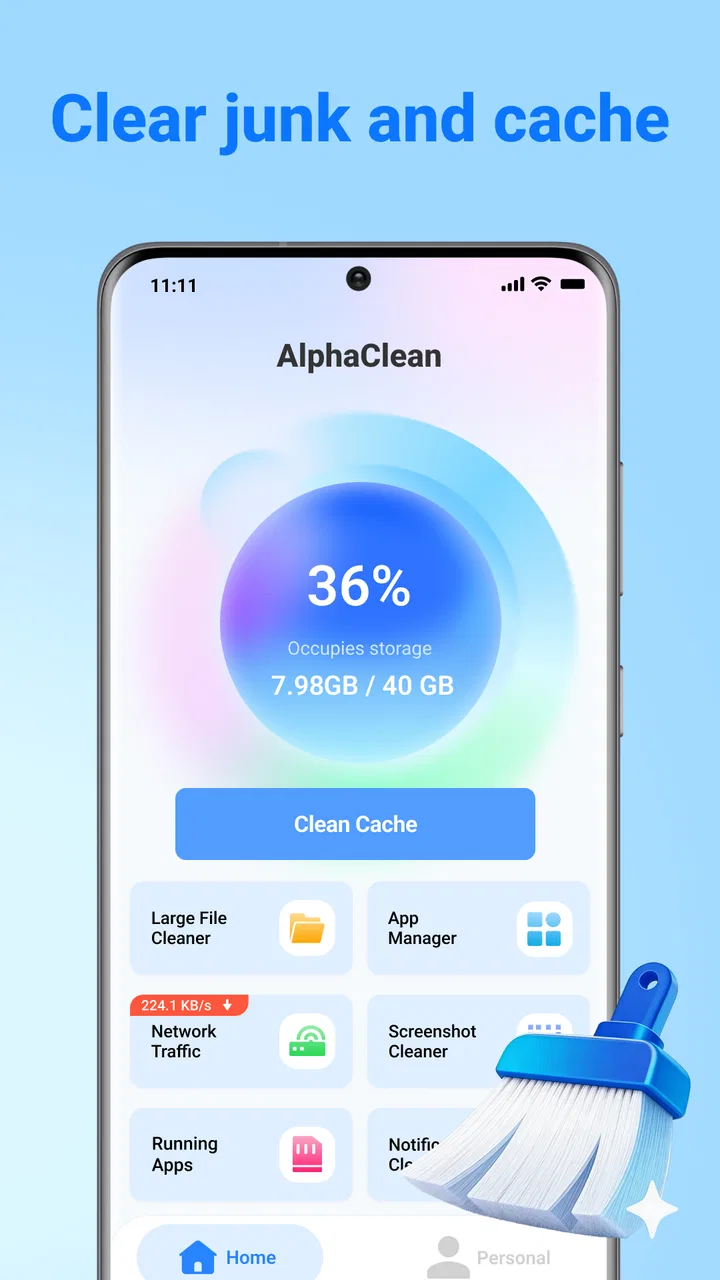
My first useful step with AlphaClean would be to let it show me where the storage problem is concentrated, then pause before removing anything. That distinction is important. A storage utility is most helpful when it turns a vague feeling of “my phone is full” into a manageable review of categories and individual items. The app’s purpose is to sweep away junk files, free space, and organize installed apps, so I found the best approach was to use its results as a shortlist of possible cleanup targets rather than assuming every suggestion was disposable.
That workflow is more reliable than opening a file manager and browsing random folders. Start with the largest or least useful-looking group, inspect names and previews where available, and remove only what I recognize as temporary or unwanted. Screenshots are a good example: a long row of accidental captures can often be cleared quickly, while a folder of downloaded documents deserves more care. The time-saving benefit comes from narrowing the search, not from giving up control.
AlphaClean is free, which makes this kind of trial easy for someone who is unsure whether a dedicated cleaner is worthwhile. Its content rating is Everyone, and it supports devices running Android 7.0 or later. Those details make it accessible to a broad range of Android users, including people with older phones who may feel storage pressure more often than owners of newer, roomier devices. The current version is V1.1.0, so I would still pay attention to how the interface behaves on my particular phone rather than assuming every manufacturer’s storage layout will look identical.
A sensible setup for the first session
I would begin by deciding what I actually want from the app. If the goal is simply to recover a little space before an update, a focused scan is better than trying to reorganize the entire phone in one sitting. If the phone has accumulated months of clutter, I would work in passes: review obvious junk first, then examine large files, and only afterward look at applications that are no longer needed. This prevents the common mistake of making too many decisions while rushing.
The app organization angle is particularly useful when the installed-app list has become a forgotten archive. Instead of judging applications only by their icons on the home screen, I would use AlphaClean to create a deliberate review: keep tools I use regularly, remove experiments I abandoned, and leave uncertain apps alone until I remember why they are installed. That last step is a small but important habit. Deleting an app is easy; reconstructing its settings or finding its saved data later can be inconvenient.
I also recommend keeping a second cleanup session separate from the first. The initial pass should target clutter that is easy to recognize. After using the phone normally for a few days, I would return to see whether the remaining storage issue is caused by a particular habit, such as saving many images from messaging conversations or keeping offline files indefinitely. This turns AlphaClean from a one-time emergency tool into a way of understanding how storage is being consumed.
Where it saves more time than manual cleanup
Manual cleanup has one major advantage: I know exactly where I am looking. Its weakness is the amount of attention it demands. I have to remember which folders contain downloads, distinguish screenshots from camera photos, and move through multiple app settings to find stored material. AlphaClean’s appeal is that it gathers the maintenance task into a more focused utility experience. That is a meaningful difference for anyone who postpones cleanup because the process feels scattered.
The app can also help when the problem is not one huge file but a collection of small, forgettable items. A single screenshot is harmless; hundreds are not. A few abandoned apps do little individually; together they occupy space and make the phone harder to navigate. By bringing junk cleanup and app organization together, the tool encourages me to consider both sides of the problem instead of freeing a little storage while leaving the installed-app list untouched.
There is a trade-off, though. Convenience can make users less attentive. If I were cleaning a phone belonging to a family member, I would not simply tap through every recommendation. I would explain what each group contains and ask before removing anything personal. The app is most valuable as a sorting assistant. It is not a reason to stop thinking about backups, saved work, or files that happen to look old.
Real situations where the app makes sense
Imagine I am leaving for a trip and my phone refuses to save more photos. I do not want to open every folder while standing in a station or airport. In that situation, I would use AlphaClean to locate obvious clutter first: old screenshots, disposable downloads, and applications I installed temporarily. The goal would be a quick, controlled recovery of space, followed by a test photo or download to make sure the immediate problem is solved. That is a realistic use case where reducing friction matters more than advanced customization.
Another scenario is a shared household phone used by several people. Over time, children may install games, adults may add shopping or travel apps, and nobody may remember which ones are still needed. AlphaClean’s app-organization role gives me a single place to review that accumulation. I would still ask the phone’s owner before uninstalling anything, but the review itself becomes easier because it is treated as maintenance rather than a hunt through home-screen pages.
It can also be useful before handing an older phone to someone else in the family. I would remove personal clutter, review unused applications, and leave the device with a clearer structure. I would not confuse this with a complete privacy reset, however. A cleaner can help organize and remove unwanted material, but preparing a phone for another person requires a separate, deliberate process for accounts, backups, and personal information.
What the app removes from the process
The biggest friction AlphaClean addresses is the need to remember where clutter lives. Android phones often collect files through browsers, messaging apps, cameras, social platforms, and document tools, each with its own habits. Even when I know a file is unnecessary, finding it can take longer than deciding whether to delete it. A dedicated cleaner reduces that search burden by making maintenance feel like one planned activity.
The second friction is decision fatigue. When I browse storage manually, every folder invites a new question. A focused cleanup view lets me handle one type of material at a time. I can make faster decisions about obvious clutter and reserve complicated files for later. That separation is more valuable than a dramatic promise of instant transformation because it gives me a repeatable method.
The third is app-list neglect. People often remember to delete photos but forget applications that have not been opened in months. Reviewing apps can improve organization even when the storage recovered is modest. A less crowded phone is easier to search, easier to explain to another user, and less likely to hide the tool I actually need.
The app has earned a 4.2 average from around 1.2 thousand ratings, with more than a million installs. I read those figures as signs that the basic idea is attracting real interest, not as proof that every phone will produce the same experience. The number of reviews is 24, so I would place more weight on my own cautious workflow than on assuming the public response answers every practical question.
Small habits that make the utility more effective
My first tip is to clean before storage becomes critical. When the phone is already refusing downloads, I am more likely to delete something too quickly. A short review while there is still breathing room makes it easier to inspect files and keep anything important. I would use AlphaClean after a busy period of travel, events, or document-heavy work, when temporary material tends to pile up.
My second tip is to separate “unwanted” from “infrequently used.” An app I open once every few months may still be important, such as a travel, banking, or authentication tool. I would not remove it only because it is quiet. Instead, I would use the app list to identify candidates, then decide based on purpose and whether reinstalling would be simple.
My third tip is to use a before-and-after check that does not rely only on the storage number. I would try the action that originally failed: save a photo, download a file, or install an update. If that works, the cleanup solved the real problem. If it does not, the phone may be dealing with a different constraint, and repeating broad deletions would be wasteful.
A fourth useful habit is to keep personal media decisions slower than temporary-file decisions. A screenshot of a ticket may look disposable after the journey, but a screenshot of a receipt or instruction may still matter. I would review visual files individually when their context is unclear. The app can speed up discovery, but it cannot know why every file matters to me.
Where the usual alternatives may be better
Android’s built-in storage tools are often enough for users who want a basic overview and prefer not to add another utility. They may feel more familiar and can reduce the number of places where I manage files. If I already have a disciplined folder system and rarely install temporary apps, AlphaClean may not change my routine enough to justify keeping it.
A file manager is the better choice when I need precise control over folders, filenames, transfers, or cloud locations. Its strength is detail. AlphaClean is more appealing when I want a guided maintenance pass rather than a complete file-management workspace. These are different jobs, and choosing between them depends on whether convenience or granular control is the priority.
Some phone manufacturers also include their own device-care utilities. Those may be better integrated with the hardware and system settings, especially when I want to manage battery behavior, memory, or manufacturer-specific recommendations alongside storage. AlphaClean has a narrower, more focused identity around junk cleanup and app organization. That focus can be an advantage for a cluttered phone, but it is not a replacement for every maintenance feature a built-in tool might provide.
Limits I would keep in mind
The main limitation is that cleanup recommendations still require judgment. No utility can understand the personal meaning of every old image, download, or application. I would be especially careful with files from work, travel, school, health, or finance. If the app presents a group that I cannot identify confidently, I would leave it alone until I can verify it elsewhere.
There is also a practical limit to what a cleaner can accomplish. If the largest space users are important videos, music, photos, or offline maps, removing minor junk will not transform the phone. In that case, I would review those larger libraries directly, move files to a trusted backup location, or change how much offline content I keep. AlphaClean can point me toward maintenance opportunities, but it cannot make meaningful personal data occupy less space without a separate decision.
I would also skip it if I want a highly automated system that makes every cleanup decision for me. That approach sounds convenient, but it is not the one I trust for personal storage. The app suits users willing to spend a little attention in exchange for a more organized review. People who dislike checking suggestions or who already have a reliable manual routine may prefer the tools built into their phone.
My verdict after using it as a practical tool
AlphaClean: Junk Cleaner is a sensible option for Android users who repeatedly run out of space because clutter is spread across screenshots, downloads, and forgotten applications. I like its combined focus: it treats storage cleanup and app organization as connected problems, which matches how phone clutter develops in real life. The free price and Everyone rating also make it approachable for a wide audience, while support for Android 7.0 or later includes many older devices that still need careful storage management.
I would recommend it to someone who wants a guided starting point and tends to postpone maintenance because manual cleanup feels disorganized. I would not recommend relying on it blindly, and I would choose a built-in tool or a full file manager when system integration or detailed folder control matters more. My strongest recommendation is to use it in short, deliberate sessions: inspect first, remove only what I recognize, then test the task that storage problems were preventing.
In the end, the app’s success is measured less by how often I open it than by how much frustration it removes when I do. It will not replace backups, careful file ownership, or sensible app habits. What it can do is turn a scattered search into a clearer maintenance routine. For a phone that is constantly accumulating small leftovers and unused apps, that reduction in effort is enough to make AlphaClean worth trying.
FAQs for AlphaClean: Junk Cleaner
01What is AlphaClean: Junk Cleaner, and what does it do?
AlphaClean: Junk Cleaner is designed to help Android users identify and remove unnecessary files that may be taking up valuable storage space. After scanning the device, it can generally highlight items such as cached data, temporary files, leftover installation packages, and other clutter. Its main purpose is storage management, not a guaranteed performance boost, so results will depend on your phone’s condition and the categories you choose to delete.
02Is AlphaClean: Junk Cleaner safe to use?
The app can be useful when used carefully, but no cleaning tool should be given permission to delete files without reviewing its results first. Before confirming a cleanup, check the selected categories and make sure important downloads, photos, documents, or app data are not included. You should also review the permissions requested by AlphaClean and install it only from a trusted source. Keeping a backup of important files is recommended.
03Can AlphaClean: Junk Cleaner improve my phone’s performance?
Removing unnecessary files may make more storage available and can help a device feel less crowded, particularly when storage is nearly full. However, AlphaClean cannot solve every performance problem. Slowdowns may be caused by aging hardware, excessive background activity, battery wear, or demanding applications. In testing, a cleaner is most helpful as a storage-maintenance utility rather than a tool that guarantees faster processing, longer battery life, or improved gaming performance.
04Does AlphaClean: Junk Cleaner delete personal photos, videos, or important files?
A cleaning app may scan folders containing personal media and documents, so users should not assume that every suggested item is disposable. AlphaClean’s results should be reviewed carefully before starting a cleanup, especially when duplicate files, large files, or media categories are displayed. Do not approve deletion if you are unsure about an item. Confirm that valuable files are backed up and understand the app’s selection options before proceeding.
05Is AlphaClean: Junk Cleaner free, and are there advertisements or premium features?
The availability of free tools, advertising, subscriptions, and premium options can vary according to the version distributed through the app store and the user’s region. Before downloading or starting a scan, check the current store listing for pricing details and read any subscription terms shown inside the application. Pay particular attention to free-trial duration, automatic renewal, and which cleaning or privacy features require payment, since these details may change over time.
Pros
- Quickly identifies cached files and leftover junk
- Simple interface that is easy for first-time users
- Offers tools for finding large files and unused apps
- Can help free storage without requiring technical knowledge
- Useful battery and memory insights in one place
Cons
- Some cleaning suggestions may require manual review
- Scanning speed can vary on older or low-end devices
- Aggressive cleanup may remove files you intended to keep
- Extra features may be limited behind premium access
- Frequent notifications can become distracting for some users

AlphaClean: Junk Cleaner
Gallery